
Textr Team Web now supports AI Texting. Translate messages directly in a conversation, or translate what you are composing before you send it, making cross-language communication easier than ever.
How It Works
Web currently offers two ways to translate:
In-thread Translation
Translate messages you have already received in a conversation. When someone sends you a message in a language you are not fluent in, you can translate that message directly, without switching to another tool.
Compose Translation
Translate a message you are editing but have not sent yet. Write your message, then translate it into your recipient's language before sending so your meaning comes across clearly.
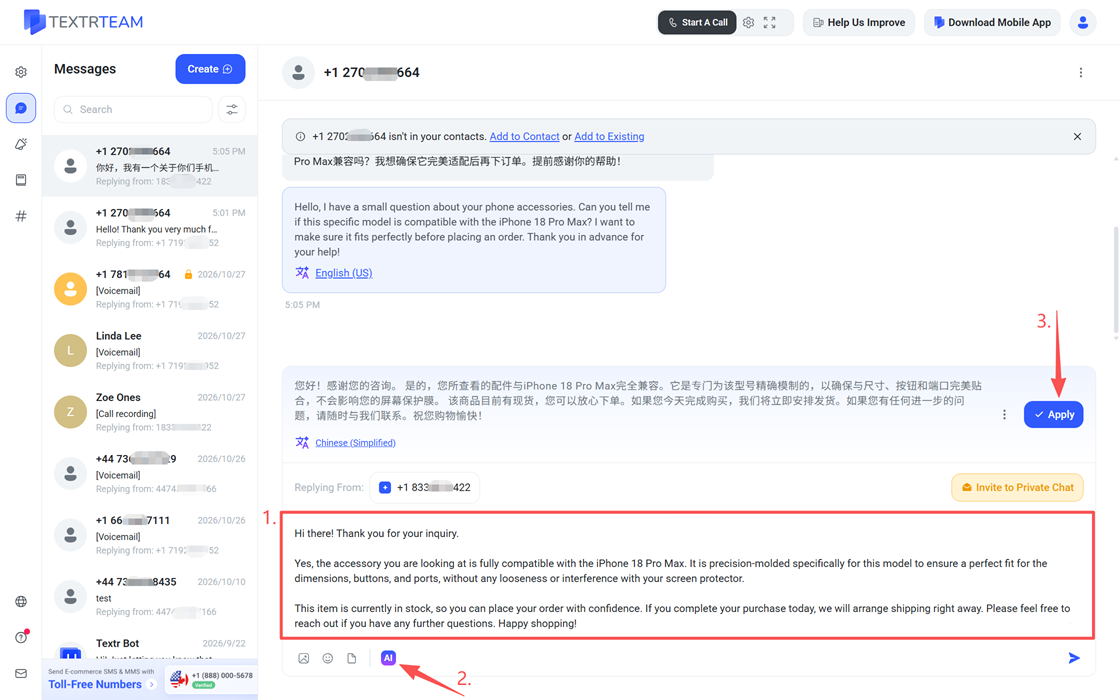
Supported Languages and How Translations Are Saved
- Supports over 90 languages, covering common cross-language communication needs.
- Translations are saved by the browser on your local device and are not stored on Textr Team servers.
Note: Translations are saved only on your current device and browser. They are not shared across devices or with other members. If you switch devices or another member views the same message, you will need to start a new translation to see the result.
Usage Limits
- The feature is currently in free trial and available to all users.
- To prevent abuse, usage is limited across different dimensions. If you reach a limit, please try again later.
Mobile Support
AI Texting is currently available on Web only. iOS and Android versions are in testing and will be released soon. Stay tuned.
Frequently Asked Questions
If you run into any issues, email us at team.support@textrapp.com.