
Quick Start: Send Your First Text
Sending a text message with Textr Team takes three steps:
- Open the Messages tab in the app or web dashboard
- Click Create to start a new conversation
- Enter the recipient's phone number (or select a contact), type your message, and hit Send
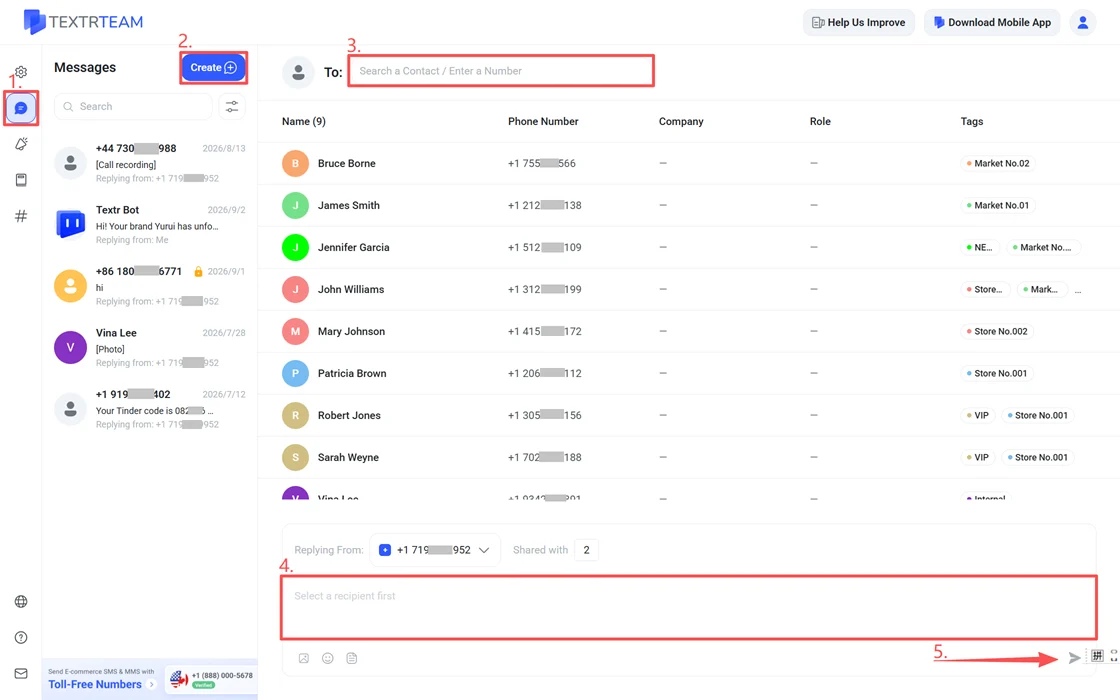
You can send texts from both the mobile app and the web dashboard. Messages sync across all your devices in real time.
SMS vs. MMS: Which Should You Use?
If you're sending plain text notifications, SMS is the most cost-effective option. If you need to share product images, promotional materials, or any visual content, use MMS. For a detailed comparison including carrier-specific limitations, see our SMS vs. MMS guide.
| Feature | SMS | MMS |
|---|---|---|
| Content | Text only | Text + Images |
| Character/File Size Limit | 160 characters per segment (70 with Unicode/emoji) | Under 1MB for best delivery rates |
| Cost | Lower per message | Higher per message |
| Best For | Order updates, appointment reminders, quick replies | Product photos, promotional banners, visual content |
To send images, see How to Send Picture Messages (MMS).
Frequently Asked Questions
For more questions about sending SMS and MMS, see our complete FAQ.